UbiComp-Maker Design Sprint: RiskWatch

Introduction

In today’s phenomenon, staying clean and social distancing plays a big role when it comes to minimizing this disease that has been spread around the whole world. Having technology that can differentiate an object that is clean or dirty just from a scan can help save many lives. Knowing if some object is dirty, can help minimize many people from getting sick by touching things they do not know if it is clean or dirty. Our product, RiskWatch can help you identify those objects. Creating RiskWatch, we thought that having a watch is like having a smartphone, it has the features to do the identifying. As well as a small camera to detect an area.

Ideation

Coming up with the idea:

Thinking of an idea was the first process, each group member took about 20 minutes to jot down their knowledge and create a list of UbiComp technology.
Final Idea:

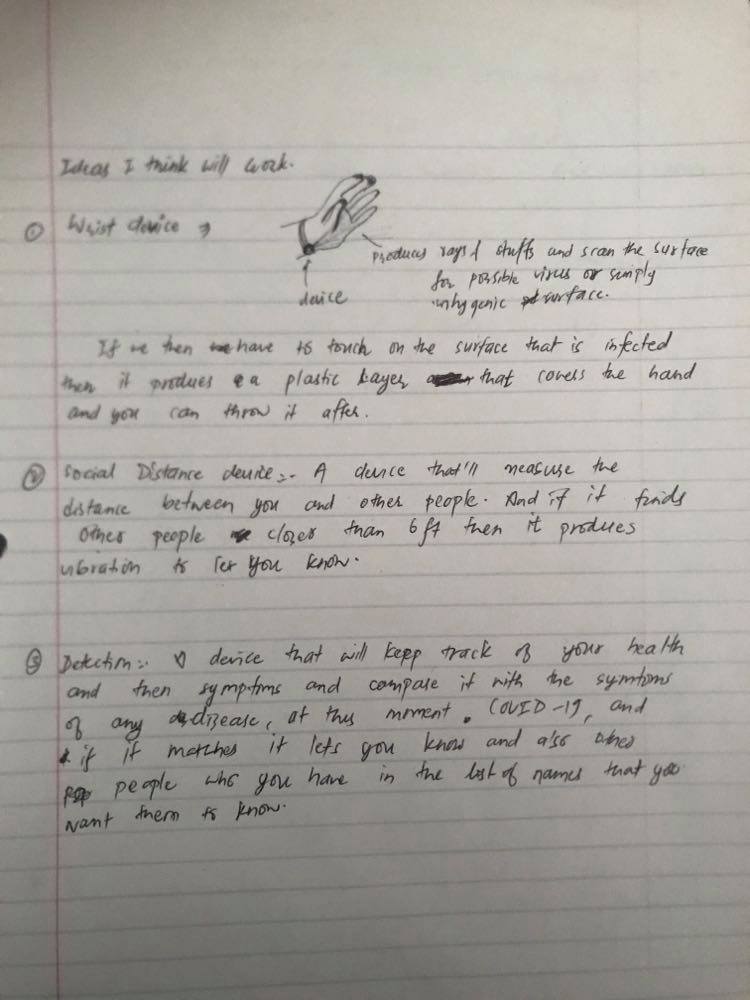
After collaborating and sharing our ideas, we agreed upon the idea with the most potential. Then we started to discuss the final idea more and created different features we can include to our UbiComp device.
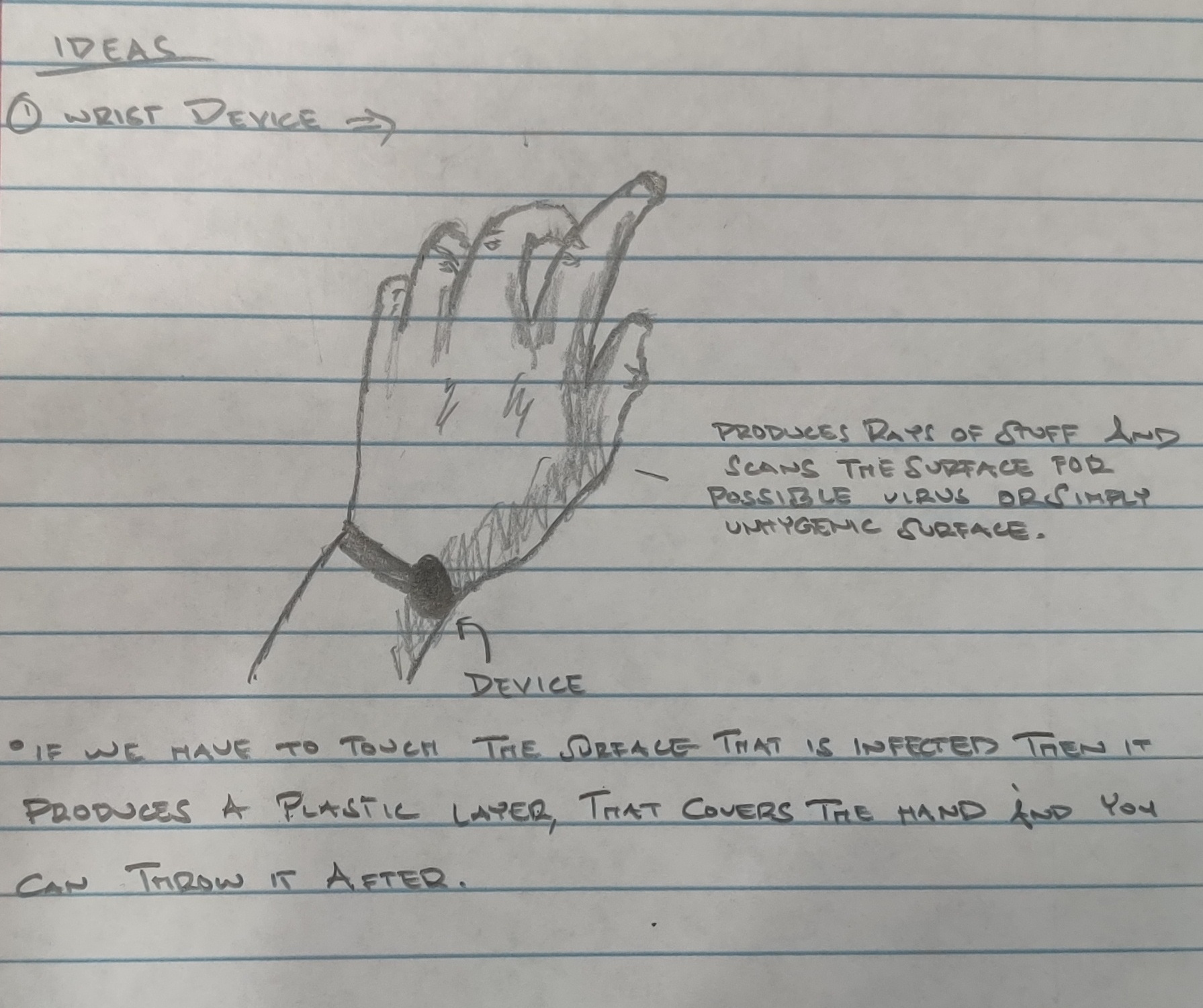
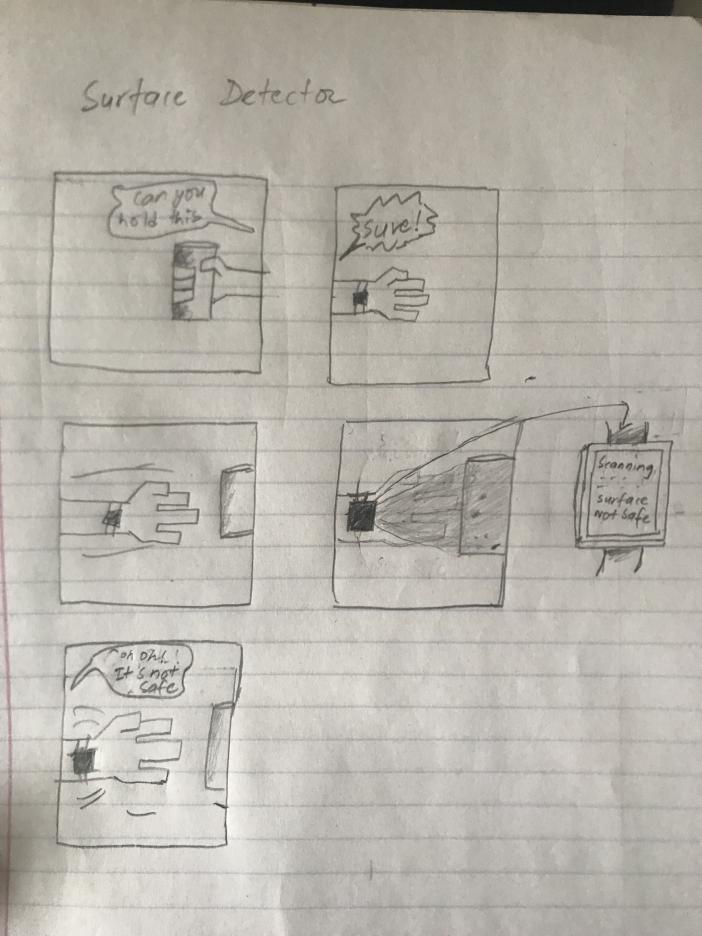
The images above shows our idea process after agreeing to RiskWatch as our final idea of the device

Designing RiskWatch

For our groups device design, we thought of creating a device that would help throughout this pandemic. The idea of our device is to help people stay safe by making sure they avoid unsafe surfaces. At first we had another idea, to create a social distance device. That device will measure the distance between you and other people. If it detects someone who is closer than 6 feet from you, it produces a vibration to warn you. But this design did not last long for us, we thought it was to practical. Instead, we came up with RiskWatch. Our thoughts on this app was to save the people’s life. At first when the idea first came up in our mind, we thought it would be a great way for people to avoid touching unsafe surfaces. You might not know it, but many bacteria from the virus stays on the surface for more than a couple hours or even a day. Our thought was to minimize people touching unsafe surfaces. Some people would touch the unsafe surface than touch their face, causing them to get sick afterwards.

Heat Sensitivity Sensor
Camera device to scan the surface. Also will be recorded via phone so you can note the places you have been

The idea of RiskWatch is to let people know what they are touching and if it is safe to touch. With the whole pandemic, many people are getting sick from not washing their hands after touching something. We designed RiskWatch to prevent people from getting sick after touching a not clean area. After thinking about people not washing their hands after touching an area, we created another idea of the device producing a plastic to wrap around your hand to touch something if it unsafe to touch. After doing so, you can throw away the plastic and put replace it with a new plastic. Another feature that we came up with was a heat detector feature. This would mainly be useful for people who are disabled. With the heat detector it would detect if a surface is too hot to touch. If the surface is then too hot, then it produces a notification to user. In designing this device, we hope that RiskWatch can fulfill your expectations and help save lives.

Storyboard

(click on image to view original size)

The storyboard is our roadmap in creating the video prototype. It demonstrates the basic usage of our device and helps our consumer understand what our product is. Understanding different ways to storyboard, we will be able to set a plan to create our video design. Regardless of your budget or design experience, you’ll be able to create a clear map that seamlessly guides you through production.

Video Prototype

Evaluation

Survey: https://sonoma.az1.qualtrics.com/jfe/form/SV_5A6HW420dg0k1lH

Our initial idea of the survey was to get our consumers input on how often they wear watches, what they are looking for in a smartwatch that can detect viruses, what can be improved after watching our video prototype, and their own thoughts about our device helping disabled people. By answering the different types of questions, we know how we can improve the device to satisfy our consumers experiences.

After getting feedback for our survey, we realized that our consumers wanted for us to ask them how to improve our product. This was a way for us to take back their feedback on the device and make it fit their expectations. One of the feedback to our survey was our heat feature. We wanted to implement a heat feature on the device to help people with disabilities. This would detect if a surface is hot, then notify the user that they should not touch that area. The idea of the heat feature was our main positive feedback in the survey. Other than that, the feedback to the survey were all positive. Many enjoyed how fast and easy the questions were, but yet difficult enough for them to think and answer. The survey aimed to get information about how often people use wearable technology as well as the functions and usability. After getting our consumers input, we will then understand more about their expectations and how we can improve RiskWatch in the future.

Strengths and Weaknesses of Final Prototype

After we received feedback from our survey applicants, as a group we felt satisfied with the feedback. Many respondents gave us positive feedback about our product.

However, we did notice some weaknesses regarding our device because of the prototype. Some of our respondents gave negative feature, because they viewed our device as a magical COVID-19 detector. Although that was not our intention to create a COVID-19 detector, our idea of including COVID-19 was an example of a disease or a virus that it could detect.

Worked?

  • All agreed to the topic
  • Successfully thought out our device functionality
  • Created features that would help during this pandemic
  • Easy and user friendly device
  • Our device helps people who are disabled

Didn’t Work?

  • First video prototype
  • Questions in our survey were confusing

Implication For Design

After completing the design for this Ubicomp maker process, the thoughts of improving this prototype has came cross our minds. Some factors that can be improved in our device would be making the scanner more reliable or known to all types of viruses and diseases. By doing this, we would have to download it into the software of this device. As of now, we designed this device to detect and scan basic viruses. Also, another factor that we can improve on was the example of virus we used in the video prototype. It seemed like it caused a huge confusion to what we wanted our device to demonstrate. Our device can detect a virus by scanning the area and the object. By doing this you can see if an area is clean to touch, so you do not get sick from touching unsanitary things.

Social Distancing

As the spread of COVID-19 continues, many communities are being asked to reduce close contact between people. In doing so, we are practicing social distancing. This is an effective way to help slow down the spread of the virus. Social distancing means staying at home as much as possible and avoiding crowded, public places where close contact with others is very highly. Now everywhere, there is an order to stay at home in many cities. An outcome of that would be cancelling events and gatherings of more than 10 people, closing shops, restaurants and bars, movies, etc. Only essentials are open, like grocery stores and food places that only do takeout.

With everything closed and social distancing, that does not mean you have to isolate yourself from friends and family. Staying connected with each other is more important than ever. Similarly, staying connected to our social groups provides familiarity, solidarity, and most important is comfort. There are many ways to stay connected with others, think of creative ways to stay in touch with your friends and families. This includes social media, Facetime, Skype, Zoom calls, etc.

Be Ready For The Next Pandemic

We do not know what virus will cause the next pandemic, and there is no way to develop and deploy an effective vaccine against the virus. The step we can do is to be prepared for it and monitor updates and news about the pandemic. A way to be prepared for the pandemic that we saw going on during this pandemic would be stockpiling. Other than that, we learned a new strategy to prevent or decrease the likelihood of getting the virus by maintaining personal spacing and decrease contact between individuals, practicing good hygienes, using masks for going out, and intervening by closing big gathering locations.

Concluding Summary

When designing wearable technology, as designers we need to focus on how the user can best achieve their experiences with our product. Also, we need to develop a journey for the user by crating mental models and evaluating how to best align the users intuitive perception of the product. While creating this device, we thought about this process of keeping the user satisfy with our product. So we decided to create RiskWatch to satisfy the needs of many people during this pandemic. Many people are in fear and taking caution about the objects and surfaces they touch. While creating this device, we had some ups and downs on some ideas on how we can keep our consumers satisfy with the device. Some of our highlights in designing this product are the heat feature and that this product can help save lives by detecting a surface that is unhygienic.

Other than the features of RiskWatch, we expect this device to be useful during this COVID-19 situation. During this pandemic, we have to practice social distancing and being prepared for the next pandemic. For social distancing, that does not mean you have to isolate yourself. There are many creative ways to stay in touch with friends and family. After this situation dies down, we hope that idea of staying clean and having good hygienes still takes an active role in our lives.

Remote vs In-Person Learning Blog

Main Ideas: Re-Place-ing Space

Article Summary: Re-Place-ing Space: The Roles of Place and Space in Collaborative Systems

In the article Re-Place-ing Space, focuses on the argument that spatial models are being misplaced. There are many communicative and collaborative environments that uses the the notion of space organization and structure interaction. Furthermore, they go over their own research, which highlights the distinction between place and space. The main takeaway of space that I understood is that it is something abstract, without any substantial meaning. Whereas, place refers to how people are attracted a certain part of the space. In other-words, a place can be seen as a space that has a meaning towards it. The article describes a place as a frame with interactive behavior.

Remote vs In-Person Learning

In the quick shift by colleges from in-person to online instruction in response to the COVID-19 pandemic has been a struggle to many lately. I think some of the key things people have been struggling with have been, how do we support each other through this difficult challenge in our lives. The transition to remote learning, while seamless for some students, is not equal across the board. Some of whom may be unable to secure an affordable or consistent access to the internet. Ultimately, how students adjust will largely depend on their ability to access information technology at the same level as they did on campus.

The challenges of remote learning, is shown from struggling to understand assignments and getting easily distracted, to not having reliable internet. These different aspects creates a distraction and poor education to us students. While an in-person class, many students are limited to being on their phones, laptops, therefore, decreasing the amount of distractions. Having these remote classes, increases the amount of distraction because most people access their online lecture from home or their place of work.

Experiences I Encountered During this Phenomenon

In my experience, being a Computer Science student, we are constantly using the internet or technology. In my household, it is hard to connect to the internet, due to the people living in this capacity. At some part of a lecture, I would lose connection in our Zoom meeting, causing me to miss information. Luckily, some teachers record the lecture so people who cannot attend the lecture can always watch the recording on their own time.

Though, there are many concepts that lasted with remote learning. Such as the information and work given from the teachers, that would not change (except for midterms). The teacher still helps the student in every possible way they can. But for my experience, some of my teachers do not know how to use some platforms, like Zoom or even Canvas. The hard part with this, is that it is hard for me and others to know what assignments are assigned. They instead rely on Piazza for relaying the assignments to us. With Canvas, you can see clearly when the due dates are and a specific description on what you have to accomplish.

I did not realize that I took my routine and school day for granted until now. My online lecture days consists of waking up late afternoon instead of 9 am. Now, working on my laptop in my bed instead of a classroom, and now I make my own schedule. While this sounds pretty enjoyable for any college student, it has made me miss school. Miss being in the campus with my friends and hanging out in the library. Miss sitting in a classroom with a teacher and other students, having clear interesting discussions. Having remote lectures makes me realize how much I miss being in campus, because online lectures consists of multiple audio and video errors. At some point during a lecture, the video would freeze then the audio continues and vice versa for the audio not working.

All through this COVD-19 madness, I feel like my education is not being fulfilled. I have a significant lack of motivation and I miss the thought of the provoking discussions we had during in person classes. There is one quote that stuck with me throughout the reading and I would like to conclude my blog with it, “Places have social meaning”.

UbiComp/Maker Primer

“Machines that fit the human environment, instead of forcing humans to enter theirs, will make using a computer as refreshing as taking a walk in the woods.”

Mark Weiser

Introduction: Summary

Main Points in The Computer For The 21st Century:

  • “Personal computer” is a misplaced idea
  • Ubiquitous computers come in sizes suited to tasks
  • Architectural trends will assist ubiquitous computing
  • Network, software and OS support will evolve
  • The obvious security and privacy issues must be resolved

In the dawn of the 21st century we are witnessing a computer revolution. In The Computer For The 21st Century by Mark Weiser, he discusses our relationship with technology and how technology should exist within the world. One of his beliefs was that technology made a huge step when it becomes invisible. But we know that has not happened yet. The key word to look at, is progress. When we see the progress and become aware of it, we can then focus on other goals. Weiser also takes challenge in virtual reality and introduces the term “embodied reality” as more accurate term. Another topic that Weiser believed in was the similarities between multiple scales and devices were to modern laptops and tablets of today. The main comparison he talked about was how we would a tablet or laptop differently than a post-it note. Weiser believed that these devices will become more appearing in modern life as the paper note found in an office.

Democratizing technology: pleasure, utility and expressiveness in DIY and maker practice

Technologies have always shaped our structure between societies. Going even further than technology: DIY, hacking, and craft have recently drawn attention in HCI and CSC. In the article, Democratizing Technology: Pleasure, Utility and Expressiveness in DIY and Maker Practice, is written by four Canadians who are in reputation for the Computer Human Interaction. The authors of this article are professionals who come from the background of university professors and makers themselves. This article summarizes the product of a large series of studies that the authors conducted. They made many observations regarding the DIY, hacking, craft, and making cultures influence in industrial infrastructure. The layout of this article demonstrates informative anecdotes that help support their observations and reasoning. One example that I enjoyed in the article was about the man who classifies himself with the “Steampunk Practitioners” community. With this idea, most makers, DIY’ers, and hobbyists would classify themselves. Many people used to make things all the time, but with the industrial revolution came this general consensus that specialization is the only way. Meaning that if someone made a product that has been already created, then there would be no point in making one yourself. Making a product yourself allows unlimited customization and often the materials would be a lower cost.

Modern Technology vs UbiComp Goals

The society has been dramatically changed with the evolution of technology. Due to the convenience and efficiency provided by technology, our lives have improved significantly. Relating this idea to Weiser, over the years he persuaded many about his concepts about computing UbiComp. Many of these concepts have been created into modern technology. For an example, Wireless Sensor Networks, Wearables, Cyber-Physical Systems, and Internet of Things. Putting this in mind, we can see that our modern technology reached Weiser’s beliefs and the beliefs of the four Canadian authors of Democratizing Technology. The idea of Ubicomp, the technological evolution resulted in many benefits to our society.

Technology With Democratized Practice

The term democratization of technology refers to the process by which access to technology rapidly continues to become more accessible to more people. New technologies and improved user experiences was created by new user demanding products that are affordable and user friendly. Also, ubiquitous computing enhances the social process of urban development. This would be the role of UbiComp as infrastructure in these activities, becoming highly important and has the potential to exhibit many potential negative and positive effects. What technology would meet these expectations from UbiComp? I think that the Cloud exemplifies these expectations that Weiser described for UbiComp. Cloud in the modern technology, surrounds the web, it has revolutionized the way data is delivered through access of computation. With many networked devices around us, information and data is truly at our fingertips. In the future, Cloud could eventually create even richer data types. This would allow us to communicate the past and present phenomena. The Clouds capability of security and privacy are alarming, they take an enormous caution considering appropriate social protection.

Design Sprint: “Fun” Game

“Our fingers push and pull with the beats and pulses of the game, using the controller to develop a cadence as surely as a drummer does when slicing his sticks around a drum kit.”

– Hamilton, 2011

Introduction

Every time a person interacts with a computer, there are rhythms of action and response. Some of these interactions with the computer will be rhythmically expressive. When interactions are rhythmically expressive, they can give the user a level of creativity that is similar to that of a musician playing an instrument. This project is asking what a close phenomenological focus on this type of rhythmic experience might reveal about the design of human computer interactions.

The goal of the initial project as a group was to create a unique and fun game using the Unity engine, based off the ideas of what fun is. There are some core concepts that we had come up with and wanted to implement into a game. With that in mind, we decided to create a rhythm game with the intention to implement a “gotcha” feature. After creating the game through Unity, we will then implement the game, so that you can play it using the Nintendo Switch.

What Is Fun?

As a group, we had to understand what exactly fun is and what makes a game “fun”. A game is considered boring when the mechanic is too easy and the players do not feel challenged. when the mechanics are fat too difficult, players tend to lose interest in playing the game. Juggling both of these together we had to create a game that wasn’t too difficult, but still challenging to the players. When people play these types of games sometimes they can enter some kind of headspace called “flow”, where they feel immersed into the game and everything else is tuned out. As Team Dr.Beats, we aim to deliver this type of excitement and experience to our players.

Video Prototype – The Beginning Story

The idea our video prototype was to include the story behind our game. The beginning scene we are introduced to the protagonist, DarkLord. He is the mind controlling bad guy. We can see he takes over some “minions”, to join his evil empire. Then we are introduced to the antagonist, who would be us, the players of the game. We will go against DarkLord by dancing.

Designing Dr. Beats

For our groups game design, we decided to create a user friendly and fun rhythm game through Unity. In doing so, we ended up creating a rhythm game that would be strategic and an appealing theme. With so many different rhythm games, we decided to make our own original element to add to the game. The other options that we looked into were creating a design that is similar to other rhythm games, but we wanted to be different. We looked into Guitar Hero and other rhythm to get a better “feel” on what we wanted to create. If we did not look at those for inspiration, we would have gone through a whole different aspect. Since we all like anime, we wanted to create that gotcha feature instead of a simple rhythm game. In doing so, we are using the Nintendo Switch. With using the Switch, the players can either be sitting or standing, which ever they prefer.

Also, to make the game more original we added the aspect where each controller would be able to hit any arrow. This allows the player to not only pick whether they want to sit or stand, but they can choose which hand to hit the notes with. This allows the players to have more freedom with our game and simulates more of a dance, rather than just hitting plain arrows as they come. We also made it appealing by adding an animated character of a computer science teacher at Sonoma State. Also, we added a song from Blackpink, to attract people who enjoy listening to Kpop. Their music is great and has nice upbeat tempo which seemed fun to play.

After implementing this idea to the game, we coded this in C sharp. The tedious part was making the different moves to match the beat of the song. Instead of adding the moves in groups, we added the moves individually, while listening to the song. This was a very tedious way to add the arrow movements.

Rhythm is center of our gameplay. So-called BPM(beats per minute) with its frequency you move your head to a cool track. But if you want to build your game around the rhythm you should get it first.

Worked?

  • The basic functionality of a rhythm game
  • Gameplay works
  • Setting work: change volume
  • Able to change songs
  • Able to pause, restart, overall navigate through the game
  • When you hit the button, the arrow disappears. If you miss it, the arrow goes straight through. Just like you missed something

Didn’t work?

  • Did not have time to include the gotcha feature we were planning
  • Not that many song choices
  • Not having a music video play in the background
  • We could not figure out how to include the Nintendo Switch remote

Game Layout Idea (Stage 1)

Here is a little sketch of how we wanted the layout of the game to be. The name and the percentages on the side indicate the different leveled character’s you would get every time you level up or beat a stage. Then we were specifying the buttons, by shading it in, so we know what arrow or joystick we are hitting.

Implying C# & Unity (Stage 2)

After familiarizing ourselves with Unity, through the different type of examples of the platform, we ended up learning how to format the game and create different objects. It is just like a recipe which tells us how to prepare a particular dish and also describes all its ingredients and the steps to follow. In this case, we are learning how to use Unity and connecting it with our program, which is written in C#. The whole program was done in C# using the unity engine. It had a learning curve because not only did we have to learn a new language, but we also had to learn how to write a utilize script language to do what we want with the Unity engine. Towards the beginning of our program, we had a hard time understanding the learning curve. But as we got further in the project it became more understandable. The hard part of the implementation was the music. In terms of getting the arrows to match the beat of the music and also including it into Unity. We had to understand the beats per minute of the song. The unity engine made it somewhat easy because it allowed a drag and drop function, which allows us to drop our scripts so that they did specific things.

Character Design (Stage 3)

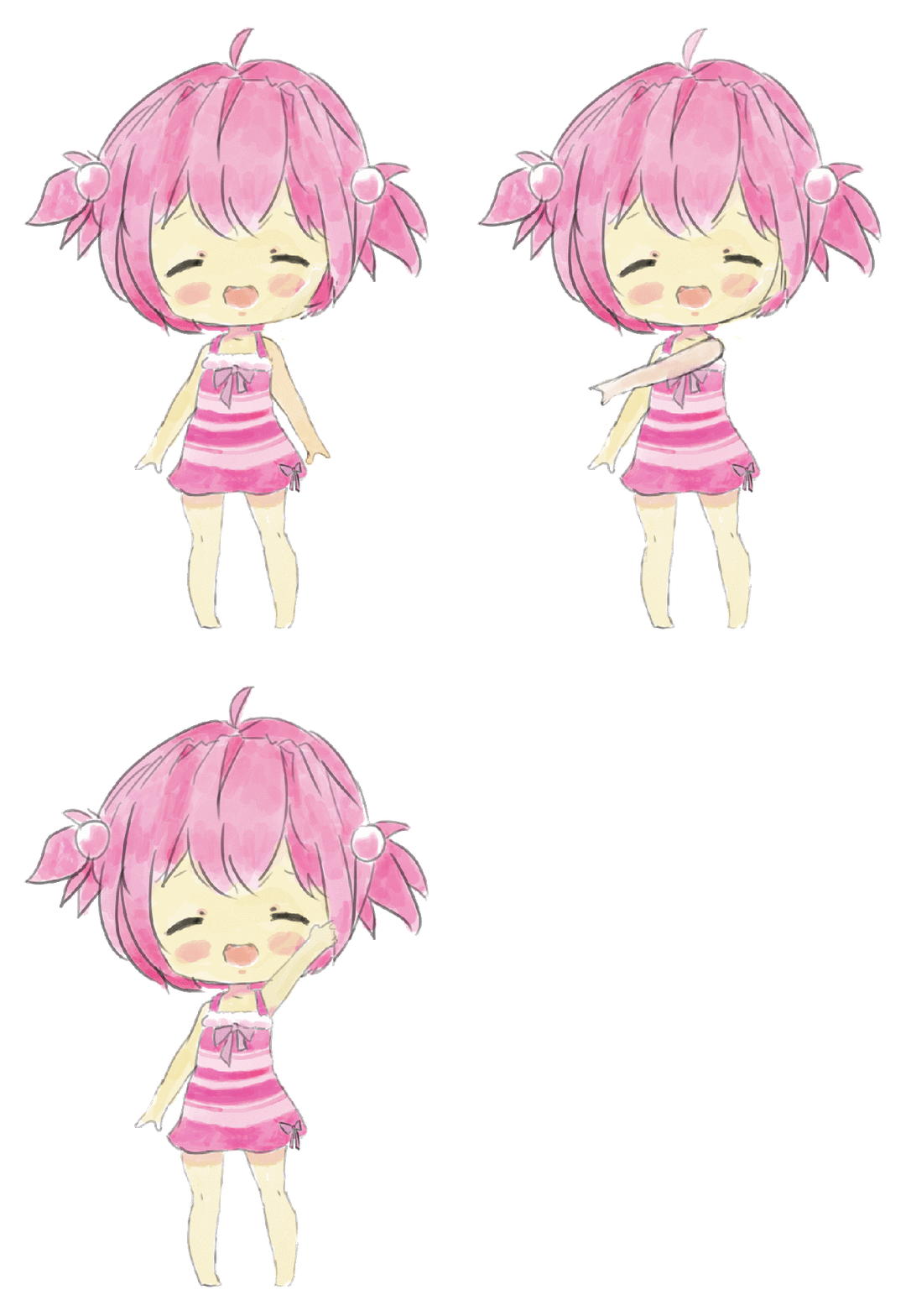
This is our first design of the character. We had the intention to create a cute chibi professor. The three different picture shows the different poses of dance. We are going to use the character to dance around with these poses while playing the game. The first idea of creating the characters was to be included with the gotcha feature. We were planning to have more characters at different levels. If you beat one professor, you would end up getting another higher level professor. But due to having a small amount of time to complete the game, we will not be including the gotcha feature in our rhythm game.

Final Character Dance gif

Remote Functionality (Stage 4)

As you can see from the image above, it shows our brainstorming on how we wanted to implement the functionality of the Switch remote. We wanted to design it in a way where the player can move freely, as if they are dancing. The functionality was to let either remote take movement to hit the arrow. For an example, you can hit the left arrow with the right arrow and vice versa. In doing this, it can let the player dance around trying to hit the arrows. This process would be a challenge for the players. Even though it would be a challenge, the players can have fun, dance, and be free with the music.

Game Demo

Final Result – Game Demo

Implications For Design

In a different scenario, where we had programmed first before thinking of the design, we might not have thought of the idea of being original. We may have been too caught up in trying to create a rhythm game and end up looking like any other rhythm game. The design would have also become more bland because we would not be think about the players point of view. Thinking that the design would not really appeal to them since we did not plan ahead of time. All in all, if we programmed first it might be better in terms of the program, but when it comes to originality and creativity it may be lacking.

Advice To Designing A Game of Your Own

If you are an aspiring video game designer, you already know a ton about games. We recommend that aspiring designers read as much as they can, in addition to reading game design books. Stay current with what’s trending in the game industry. Follow your industry idols on Twitter to see what they are talking about, and what games they are playing. Most important is to play games of all kinds. Then decide what does and does not work well in each game. But also experience life as much as possible and take note of the “design” that is all around you. After getting a brief idea what you want to design, brainstorm and sketch a list of ideas about what you want to create. After that, you can sketch out a design layout of what you want the game to look like.

Evaluation

The kind of participants I would want for my game would be anyone who that is interested in playing the game. Our game would mainly attract participants who are interested in dancing and listening to music. To find participants, I would post our game on social media platform, such as Reddit or Facebook. This would help eliminate the issue of finding people, because these platforms are universally enjoyed and this game is pretty enjoyable.

After finding the participants that are qualified to review the game, I would then stick with an analytical evaluation because I think getting feedback through surveys with questions and a scale on what the players thought of the core mechanics (design, control, music choice, and difficulty). I would also have a section in the feedback where the participant can add their own comments, where they can go in detail with what they did like or did not like, and what we can change to make this game better. Then I can take back the feedback and implement it to the game to make it more fun and enjoyable experience.

Concluding Summary

In the end, creating and designing a game was like a complex puzzle. Video game design is not just playing video games, there is a lot of stress and hard work involved. It includes brainstorming and going after that goal you envisioned from the beginning. But sometimes you do not reach that goal you envisioned. In our case, the idea from our prototype is far from what the final result was. We wanted to include a lot more features to our rhythm game, but we did not have sufficient time to implement those ideas. The “gotcha” feature was the one main feature that we were looking forward implement into our game.

The main takeaway strength from this process was working together to create a rhythm game. It was a great learning curve experience to learn new platforms and include it with the programming language we used. The strengths of our final result from this process are the basic functionality of a rhythm game, gameplay, and option selection works. Some weaknesses in our process were not including the gotcha feature, not having a music video (animated) background, and due to the obstacles we were not able to include the Nintendo Switch remote. Since one team member had the Nintendo Switch and another member had Unity and the program on their laptop, we were not able to test the Nintendo Switch remote. Although we were not able to test the remote, having it through the Switch remote would be easier because it is suppose to mimic dance moves. Whereas the keyboard it is hard to track each arrow. Having a motion controller takes away that scope, because your eyes will naturally know what direction to move.

If our group had more time we would take account of these weaknesses and implement them to our beginning vision of the video game. Overall, we were happy with our results despite the time and the occurrences that is happening right now. We were able to experience this process and got a lot to learn from it.

CrowdSourcing Design Sprint

“Environmental cleanliness begins with each individual desire to be clean.”

― Lailah Gifty Akita

Highlights

  • Passive crowdsourcing offers perspectives on human environmental relationships
  • We systematically use social media to review different areas to clean that many users upload onto the app
  • Challenges of getting people to attend the beach clean up (Incentives)
  • Lastly, working as a team to keep the environment clean

Introduction

As people living on this planet, we are suppose to leave this place better than it was before, but are we doing so? Answer is quite questionable. There are minimal efforts shown to recycling or other types of trash. We must make severe changes, especially with all the trash that is accumulating in beaches. This issue, causes an enormous impact to the beach pollution. Which can be a huge health risk to many people who goes to the beach to have fun with their peers and family. This problem must stop now! We must take action to clean up the environment and save our planet.

What is crowdsourcing? How does crowdsourcing relate to this phenomenon?

The question lies with many people, what is crowdsourcing? Crowdsourcing is way for a company to outsource a certain task that would be normally handled within the company. Another way idea to define crowdsourcing is that it is great way to get data from the targeted audiences you aim to cater to. With crowdsourcing, people would be able to get their customer’s input on whether the idea for their specific app will be well received or not. If you’re an aspiring company, or a person looking to create a new world breaking app, getting feedback from users through crowdsourcing would be the best way to help you appeal to as many people as possible.

With that, we will use crowdsourcing to gain the attention of many audiences who would want to help this environment and save the planet. Our goal would be to create an app where a user would take a picture of a dirty beach, then upload it to the media necessarily creating a poll to clean up this beach or not. From there other users of the app would agree to clean up the beach and then creating a certain date for this event.

Implications for Design

Using crowdsourcing to attain new knowledge and ideas for companies to help individuals look at complete defined tasks at an affordable cost. Crowdsourcing demonstrates an effective goal to promoting business growth, but in some cases, some critics believe that this strategy can fail due to some challenges. The main challenge of using crowdsourcing that we would imagine, includes that the crowd may not possess the necessary knowledge and good advice, which businesses can rely on to restructure their strategies. From that, some advices that I would give colleagues would be to outline the process thoroughly, identify specific participants, give feedback, and implement the feedback to your design.

Other than the advices, a bad example of crowdsourcing is when a big company allows any participants to include their own feedback from any outside sources. The problem with this example, is if the company does not find selective participant, then anyone would be able to add their feedback, whether it is inappropriate or not.

Designing Keep It Clean

We used crowdsourcing to get feedback on ways to improve our app and connecting it to human interaction. This showcased how the app would possibly impact the users who use our app. Through pictures our storyboard was able to showcase how with our app a dirty beach full of trash would get cleaned up by volunteers or an organization.

Our app Keep it Clean, is aimed towards cleaning public parks and beaches. During our idea process, we got an idea about that aims towards helping the environment. From that, everyone loved the idea because who doesn’t enjoy a clean beach? Through our storyboard presentation, we got amazing feedback on how we could implement some sort of incentive to keep people interested in keeping beaches clean. This was brought up since not everyone would be interested in cleaning up the environment. Our idea to create an incentive was to have free food and entertainment to attract more people to clean.

To keep this event more fair to people, rather than attending the event just for the free food. We have came up with the idea to divide cleaners into groups. Each group would have a set goal of trash to bring, then as a reward they would be able to get some food. On top of that we can have a separate group dedicated towards people with disabilities or other challenges that may prevent them from reaching the quota for the amount of trash needed to be picked up. Another idea, was having a donation booth to people who would want to donate for future events. For an example the donations would go towards entertainment, food, and organizations that can help sponsor Keep It Clean.

Strengths:

  • The idea of creating an event that would help our environment
  • Layout of the app (Easy to understand)
  • User friendly

Weaknesses:

  • Did not think of an incentive during the idea process
  • How would we keep people from loitering?
  • How would we keep people from attending the event just for the food and not cleaning up the beach?

Development For Storyboard Frames

In this frame, you can clearly see a lot of trash. This would add pollution to the environment and make it a health risk to many.

Here we have a good samaritan who notices all the trash in the beach.

At this point, he takes out his phone and captures a picture of all the trash layed out in the beach.

He would then open up our app, Keep It Clean, and upload the picture he just took to the app.

In this frame it might look confusing, but it is all the same concept. We have multiple people who have the app and notices the picture the main person took a picture of in their feed. As we can see in the frame, they are all choosing to clean the beach.

Once there are enough votes to clean up the beach, the event will then be created. All the people who voted to clean the beach, they will all be redirected to this page where they can click the hyperlink to direct them to a poll.

Continuing from the previous frame, the users would be redirected to a poll that would set up the date and time for this event.

Here we have all the people who signed up to the beach clean up. They are all working hard to make this a safe and healthy environment for others.

Finally! The beach has been cleaned and people can enjoy their time in a clean environment. Along with any festivities included or sponsored.

Final Storyboard

Evaluation

The kind of participants we are yearning for our application to affect would be anyone who is interested in helping the environment. After demo day, we realized from the feedback that our app is a great idea and many people would use this app to create clean up events. Once we got the feedback, we implemented the new ideas and modified the storyboard. The one main goal that we were looking at was to find the incentive to make people attend the event and participate in cleaning up our world.

Crowdsourcing Primer

“We’ve only discovered a fraction of the platforms that one might create.” 

  – Daan Weddepohl, Peerby

This weeks assignment was based on crowdsourcing and what exactly it means and how I would engage with it. Luckily I have an understanding of how crowdsourcing works through LEGO making. However, before noting that LEGO making was a perfect example of crowdsourcing, I just thought of it as a way that a big company would split a big “project” so that individuals would work on different parts of that project. Now, relating LEGO to crowdsourcing would allow users to design their own products by building with different shapes and at the same time testing the demand.

Through the LEGO website, they give an opportunity to the users to submit their own design of LEGO’s. These designs created by the users would get voted on, then the design with the highest vote, LEGO will then start production for that new item. After learning about how LEGO accomplished this idea, I tried to submit my own design. Since this was a while back, my idea seemed to be a little bland. My whole idea was thinking about what people enjoyed doing and what was a popular demand during the time. The idea of having a board game with LEGO’s would have been a great idea to get a reply on. Another idea that I came up to my mind was having a LEGO remote control car where you can customize the body with many different LEGO pieces.

Although I did not get an answer back to my idea, it was still a good experience to learn that the company undergoes many experiences to help us consumers learn about their products. I think this was a way for the company to increase their number of product ideas, as well as connecting or improving with customer engagement. From that, the brand continues to keep their customers and continues to have many new entertaining ideas.

Even for an adult like me, LEGO’s help me relive my childhood with unique product kits that I keep for display. There are numerous of LEGO enthusiasts who display their products and even sell it at collectible shows, then end up making a huge profit out of it. To end this blog, LEGO will continue to be successful as long as they use crowdsourcing to engage with their consumers.

A Bad Design

Picture Taken At Ives Hall In Sonoma State

This second blog post is similar to the first blog post, except it is for a bad design I saw in campus. Right off the bat when looking at it, it seems like the design already looks off and out of place. Having a long sink then two regular size sinks, that one long one looks like it should not be there. Story time, when I first saw this sink, I tried to use it but then I could not reach it. Well, I didn’t want to reach over too much, just to wash my hands. I placed myself on that curvature part, but yet still a weird design sink. So, i just ended up using the regular size sink. Not to sure who would be using this sink, but it would make more sense to have three regular size sinks next to each other.

Another reason would be the location of this sink, right when you walk into the bathroom this long sink is placed right in front as you are walking to the stalls. Also, if you can tell in the picture, there are no mirrors where the sinks are. The mirror is placed near the wall towards the door. It would also make sense if the mirror is where you wash your hands. All in all, I believe that this whole bathroom layout is just a bad design and should be remodeled.

A Good Design

“Enjoy The

Sound Of Silence.”

― Timothy Salter

This secluded beautiful place is what I chose for my good design portion of my assignment because of the whole enchanted vibe it gives us. The above picture I took is a secluded place that I think is a good place to relax your mind. The fact that the place is surrounded by trees and already looks relaxing from looking at the picture, you can see that it is a good design for people who want be alone and clear their mind. This location is right by the Stevenson building along the grass, it is a little hidden within trees, so not that people would notice it. After passing through this area and saw this design, I just thought to myself how it would be nice for me to relax and listen to music, thinking that I am the only one in this world.